
This page may contain affiliate links.
Some links on this page are affiliate links, meaning I may earn a commission if you sign up (at no extra cost to you). This never influences my ratings or recommendations. Tools I wouldn't genuinely recommend are marked as such.

SurferSEO Pricing Analysis
vs. 12 SEO toolsBelow median for SEO tools

Cheaper than 64% of SEO tools on That Marketing Buddy's database.
1. Quick Verdict
SurferSEO is a full-featured SEO platform that optimizes content for traditional search and AI assistants like ChatGPT. It's excellent for content marketers and agencies who prioritize data-driven optimization. The pricing starts at $49/month, making it a premium but worthwhile investment for serious content creators.

✓Best for
- Content Marketing Teams Need data-driven optimization with real-time content scoring and collaboration features.
- SEO Agencies Managing multiple clients and need comprehensive SERP analysis with white-label capabilities.
- Enterprise Publishers Publishing high volumes of content and require AI visibility tracking across multiple platforms.
- E-commerce Brands Optimizing product pages and blog content for competitive keywords at scale.
- SaaS Companies Creating technical content that ranks well and gets featured in AI search results.
✗Not ideal for
- Complete Beginners The data-heavy interface and technical features can overwhelm new users without SEO experience.
- Budget-Conscious Bloggers At $49/month minimum, it's expensive for individual content creators with limited budgets.
- Local Businesses Most features target content marketing rather than local SEO and citation management.
- One-off Projects The credit-based system and monthly pricing don't make sense for occasional content optimization.
My bottom line: SurferSEO delivers exceptional optimization results and stays ahead of AI search trends, but you'll pay premium prices for premium features.
2. What Is SurferSEO?
SurferSEO is a content optimization platform that analyzes top-ranking pages to help you create SEO-friendly content. The platform combines traditional SEO analysis with AI search optimization, tracking how your content performs in ChatGPT, Google AI Overviews, and other AI assistants.
The tool centers around its Content Editor, which provides real-time optimization suggestions as you write. It analyzes competing pages to recommend keyword usage, content structure, and topic coverage that matches what's already ranking well. Beyond basic optimization, SurferSEO includes AI content generation, plagiarism checking, and automated internal linking.
SurferSEO's key differentiator is its focus on AI search visibility. While most SEO tools still focus only on Google rankings, SurferSEO tracks how often your content appears in AI chat responses. This forward-thinking approach helps content creators prepare for the evolving search landscape where AI assistants increasingly answer user questions.
3. Who It's For — And Who It's Not
Ideal for
Content teams and agencies producing SEO-driven articles at scale. SurferSEO's content editor turns 'write for search' from a vague directive into a measurable process. You get a score, you see what's missing, you fix it. That feedback loop is why agencies standardize on this tool for content production.
- ✓Content Marketing Teams Need data-driven optimization with real-time content scoring and collaboration features.
- ✓SEO Agencies Managing multiple clients and need comprehensive SERP analysis with white-label capabilities.
- ✓Enterprise Publishers Publishing high volumes of content and require AI visibility tracking across multiple platforms.
- ✓E-commerce Brands Optimizing product pages and blog content for competitive keywords at scale.
- ✓SaaS Companies Creating technical content that ranks well and gets featured in AI search results.
Not ideal for
Several types of users should consider alternatives before committing to SurferSEO's premium pricing.
- ✗Complete Beginners The data-heavy interface and technical features can overwhelm new users without SEO experience.
- ✗Budget-Conscious Bloggers At $49/month minimum, it's expensive for individual content creators with limited budgets.
- ✗Local Businesses Most features target content marketing rather than local SEO and citation management.
- ✗One-off Projects The credit-based system and monthly pricing don't make sense for occasional content optimization.
4. Feature Deep Dive
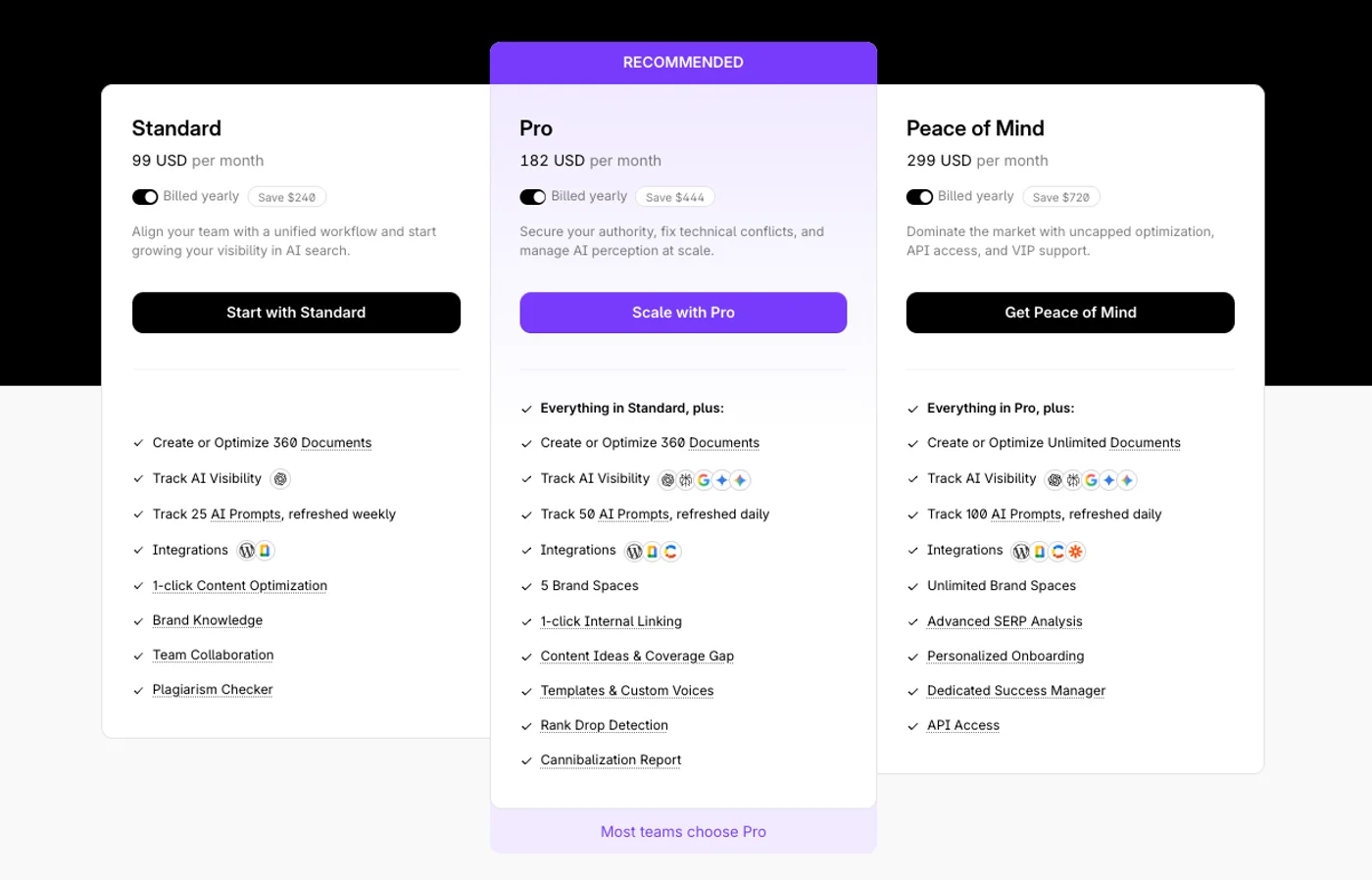
SurferSEO just rolled out updated Surfer pricing and plans on 9. february 2026.
Content Optimization
- •Real-time Content Score
- •NLP keyword suggestions
- •SERP analysis
- •Content structure guidance
- •Auto-optimize feature
AI Search Tools
- •AI visibility tracking
- •ChatGPT optimization
- •Google AI Overview tracking
- •AI content detection
- •AI humanizer tool
Content Creation
- •Surfer AI writer
- •Outline builder
- •Content briefs
- •Plagiarism checker
- •Multiple language support
Team Collaboration
- •Multi-user editing
- •Brand knowledge base
- •Custom templates
- •Team workspaces
- •Content workflow management
Technical SEO
- •Auto internal linking
- •Cannibalization reports
- •Rank drop detection
- •SERP feature tracking
- •Performance monitoring
The Content Editor is SurferSEO's flagship feature, providing a real-time Content Score that updates as you write. Going through the optimization process, you'll see specific recommendations for keyword density, content length, heading structure, and topic coverage. The tool analyzes the top 10 ranking pages for your target keyword and shows exactly what elements your content needs to compete.
SurferSEO's AI search optimization differentiates it from traditional SEO tools. The platform tracks how your content performs across ChatGPT, Perplexity, Google AI Overviews, and Gemini. This visibility tracking helps you understand which content gets featured in AI responses, giving you insights into optimizing for the future of search.
The Auto Internal Linking feature automatically scans your website and suggests relevant internal links while you write. This saves significant time and helps search engines better understand your content relationships. The Surfer AI writer can generate complete articles based on your target keywords, though you'll want to review and personalize the output.
For teams, the collaboration features work smoothly. Multiple team members can edit the same document simultaneously, and the Brand Knowledge feature helps maintain consistent messaging across all content. The plagiarism checker ensures originality, while the outline builder structures your content with compelling headlines and questions.
5. UX, Onboarding & Support
Setting up SurferSEO takes about 10 minutes to connect your website and configure tracking. The dashboard feels overwhelming initially with numerous metrics, graphs, and optimization suggestions, but the learning curve smooths out after a few content pieces.
Navigating through the Content Editor feels intuitive once you understand the scoring system. The interface clearly highlights areas needing improvement with color-coded suggestions. The real-time feedback helps you optimize as you write rather than requiring separate revision rounds.
Customer support consistently earns praise from users, with responsive chat support and detailed documentation. The Facebook community group provides additional help from experienced users and SurferSEO team members. For Peace of Mind plan users, dedicated success managers provide personalized onboarding and ongoing optimization advice.
6. Performance & Reliability
SurferSEO handles content analysis quickly, typically generating optimization recommendations within 30-60 seconds. The platform maintains solid uptime with rare service interruptions that might delay content analysis.
The AI features process requests efficiently, though Surfer AI article generation can take 2-3 minutes for longer pieces. SERP analysis updates regularly, ensuring your optimization recommendations reflect current ranking factors rather than outdated data.
7. Pricing & Value Analysis
SurferSEO starts at $49/month for the Discovery plan with annual billing, positioning it as a premium SEO tool. The Discovery plan includes 360 documents for creation or optimization, which covers most small business needs but limits high-volume users.
The Pro plan at $182/month offers the best value for agencies and larger content teams. It includes unlimited documents, advanced SERP analysis, and tracking across all major AI platforms including ChatGPT, Perplexity, and Google AI Overviews. The Peace of Mind plan at $299/month adds API access and dedicated support for enterprise users.
While expensive compared to basic SEO tools, SurferSEO's complete feature set and AI optimization capabilities justify the premium pricing for businesses serious about content marketing. The annual billing discount saves 20-24% across all plans, making the investment more manageable.
Discovery
- ✓AI SEO Optimization Guidelines
- ✓Surfy (AI SEO Assistant) & Humanizer
Standard
- ✓AI SEO Optimization
- ✓AI Writing Assistant
- ✓Plagiarism Check
- ✓1-click Content Optimization
Pro
- ✓AI SEO Optimization
- ✓1-click Internal Linking
- ✓Content Ideas & Coverage Gap
- ✓Templates & Custom Voices
- ✓Rank Drop Detection
Peace of Mind
- ✓API Access
- ✓Dedicated Success Manager
- ✓Personalized Onboarding
- ✓Advanced SERP Analysis
Enterprise
- ✓SSO & Enterprise-grade Security
- ✓Comprehensive Advisory Program
- ✓Legal Onboarding Assistance
- ✓Early Access to New Features
- ✓Custom Limits
8. Comparisons & Top Alternatives
Compared to Semrush, SurferSEO focuses specifically on content optimization while Semrush offers broader SEO capabilities including keyword research and technical auditing. SurferSEO's AI search tracking gives it an edge for future-focused optimization, but Semrush provides deeper competitive intelligence.
SE Ranking costs less at $65/month but lacks SurferSEO's advanced content editor and AI optimization features. If you primarily need rank tracking and basic optimization, SE Ranking offers better value. However, SurferSEO's content-focused approach delivers superior results for content marketing teams.
Rankability targets similar users with AI search optimization at $149/month, making it a more affordable alternative. However, SurferSEO's content editor provides more detailed optimization guidance, and its longer track record means better-developed features and integrations.
| Platform | Starting Price | Best For | Strengths | Weaknesses |
|---|---|---|---|---|
 Semrush Semrush | $165.17/mo | Complete SEO suites with keyword research | Comprehensive keyword data, competitor analysis, technical SEO tools | More expensive, complex interface, less focused on content optimization |
 SE Ranking SE Ranking | $65/mo | Budget-conscious agencies needing rank tracking | Lower pricing, good rank monitoring, white-label reports | Limited AI search optimization, fewer content creation features |
 Rankability Rankability | $149/month | Agencies focused on AI search optimization | Strong AI tracking, agency-focused features, competitive pricing | Newer platform, fewer integrations, limited content editor features |
Detailed Comparisons


9. What Others Say
Here's how SurferSEO is rated across major review platforms:
10. Real User Feedback
"Surfer has righteously earned its place in our content team's tool arsenal. We use it daily and can wholeheartedly recommend trying it."
- Jete Laager, Bolt (from main website)"I love how easy the tool is to use: navigation is simple and striking, content creation is a breeze, and the ability to analyze critical keyword and competitive data is unprecedented!"
- Capterra reviewer"Its top-notch content optimization tools, detailed SERP analysis, and user-friendly interface are game-changers for content writers."
- Capterra reviewer"At nearly five times the cost of comparable tools, Surfer AI simply doesn't deliver enough unique value to justify the premium."
- Capterra reviewer"I consistently found myself double-checking the statistics and references provided by the AI, only to discover they were either inaccurate or completely fabricated."
- Capterra reviewer11. Limitations & What Could Be Better
- ⚠Premium Pricing - Starting at **$49/month**, SurferSEO costs significantly more than basic SEO tools, limiting access for budget-conscious users.
- ⚠Credit-Based System - Even paid plans have limits on content optimizations, requiring credit management or plan upgrades for high-volume users.
- ⚠Learning Curve - The data-heavy interface can overwhelm beginners who need time to understand optimization metrics and recommendations.
- ⚠AI Content Quality - Generated content often requires significant editing and fact-checking, with some users reporting inaccurate statistics and references.
- ⚠Limited Local SEO - Features focus on content marketing rather than local business optimization, citation management, or Google My Business integration.
- ⚠Platform Dependency - Optimization recommendations heavily rely on current SERP analysis, which may not account for upcoming algorithm changes or seasonal variations.
Most of these matter more in theory than practice. If you're using Surfer for what it's built for (content optimization at scale), the core workflow is solid. The gaps show up at the edges.
Sources & References
12. Frequently Asked Questions
Yes, for content-focused businesses generating significant revenue from organic traffic. The optimization results and AI search preparation justify the premium pricing for serious content marketers.
Mixed results. The content follows SEO best practices but often requires fact-checking and personalization. Use it as a starting point rather than final output.
With effort, yes. The interface presents lots of data that can overwhelm newcomers, but the optimization recommendations are clear once you understand the basics.
Yes, it supports 8 languages including Spanish, French, German, Dutch, Swedish, Danish, and Polish with localized SERP analysis.
Each content optimization or creation uses credits. Plans include specific credit amounts, with additional credits available for purchase if you exceed limits.
SurferSEO focuses specifically on content optimization with AI search tracking, while Semrush provides broader SEO tools including keyword research and technical auditing.
Yes, multiple team members can edit documents simultaneously, with brand knowledge bases and custom templates for consistency.
Yes, all paid plans include WordPress integration for seamless content publishing and optimization directly from your dashboard.
13. Final Verdict & Recommendation
SurferSEO turned content optimization from an art into a process. That's its biggest contribution: making SEO content quality measurable and repeatable across a team.
✓Choose SurferSEO if you...
- You prioritize data-driven content optimization with measurable results
- Your business generates significant revenue from organic search traffic
- You need to optimize content for both Google and AI search platforms
- You manage content teams that require collaboration and workflow features
- You're willing to invest in premium tools for competitive advantages
✗Skip SurferSEO if you...
- You're working with a tight content marketing budget under $500/month
- You primarily need basic SEO guidance rather than advanced optimization
- You focus on local SEO instead of content marketing
- You prefer simpler tools without complex data analysis
- You only create content occasionally rather than consistently
Value for Money: ★ 8.5
Ease of Use: ★ 7.8
Features: ★ 9.2
Support: ★ 8.8
Reliability: ★ 8.7
For content teams that need consistent SEO quality across dozens of articles per month, SurferSEO pays for itself through efficiency gains alone. Start with the Essential plan, run 10 articles through the editor, and compare your before/after rankings.
Ready to try SurferSEO?
Optimize your content for Google and AI search with data-driven recommendations.
Start Free Trial →Continue Reading

SurferSEO Overview
SurferSEO Pricing: Content Optimization Plans for Every Level
Top 11 Alternatives to SurferSEO
SurferSEO vs Semrush
SurferSEO vs Mangools
SurferSEO vs Keysearch
SurferSEO vs Moz Pro
All You Need to Know About SEO in 2026
How to Rank in AI Search: The Complete Guide to SEO, AIEO, and GEO in 2026
How to Do Keyword Research in 2026: Step-by-Step Guide
How to Do an SEO Audit on Your Website: A Step-by-Step Guide
SurferSEO Affiliate Program
Similar Software Reviews

Complete SEO platform with AI search tracking, keyword research, competitor analysis, and content optimization tools.

Complete SEO platform with AI visibility tracking, rank monitoring, and competitive research tools.

Desktop SEO crawler for technical site audits, broken links, and crawl analysis.

User-friendly SEO suite with excellent keyword research tools and competitive pricing for agencies

AI-powered SEO tool for content optimization and AI search tracking built for agencies.

Veteran SEO platform with 20+ years of experience and comprehensive toolkit for rankings, traffic, and optimization